Your dream wedding,
without the chaos.
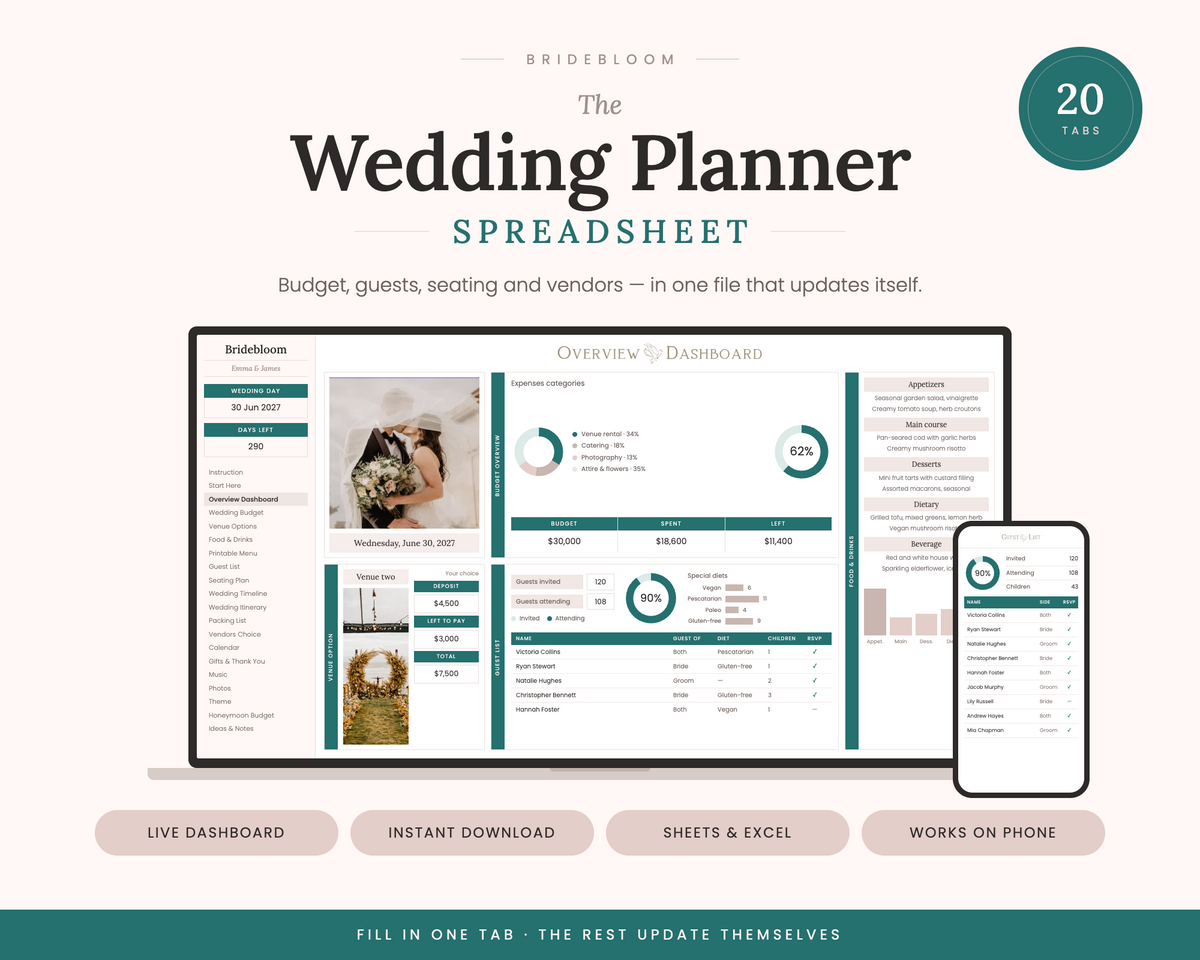
Budget, guests, seating, vendors and timeline in one beautiful Google Sheet — 20 connected tabs that update themselves as you plan.
Instant access · Yours forever · No subscription
- Instant accessLink in seconds
- Secure paymentSafe checkout
- Google SheetsNothing to install
- Fully editableEvery cell yours
- Phone & laptopPlan anywhere
- 100% digitalZero waste
Perfectly organised, from yes to I do
Automatic budget tracking
Planned vs actual by category, with deposits and balances so the total is always real.
Guest list & RSVPs
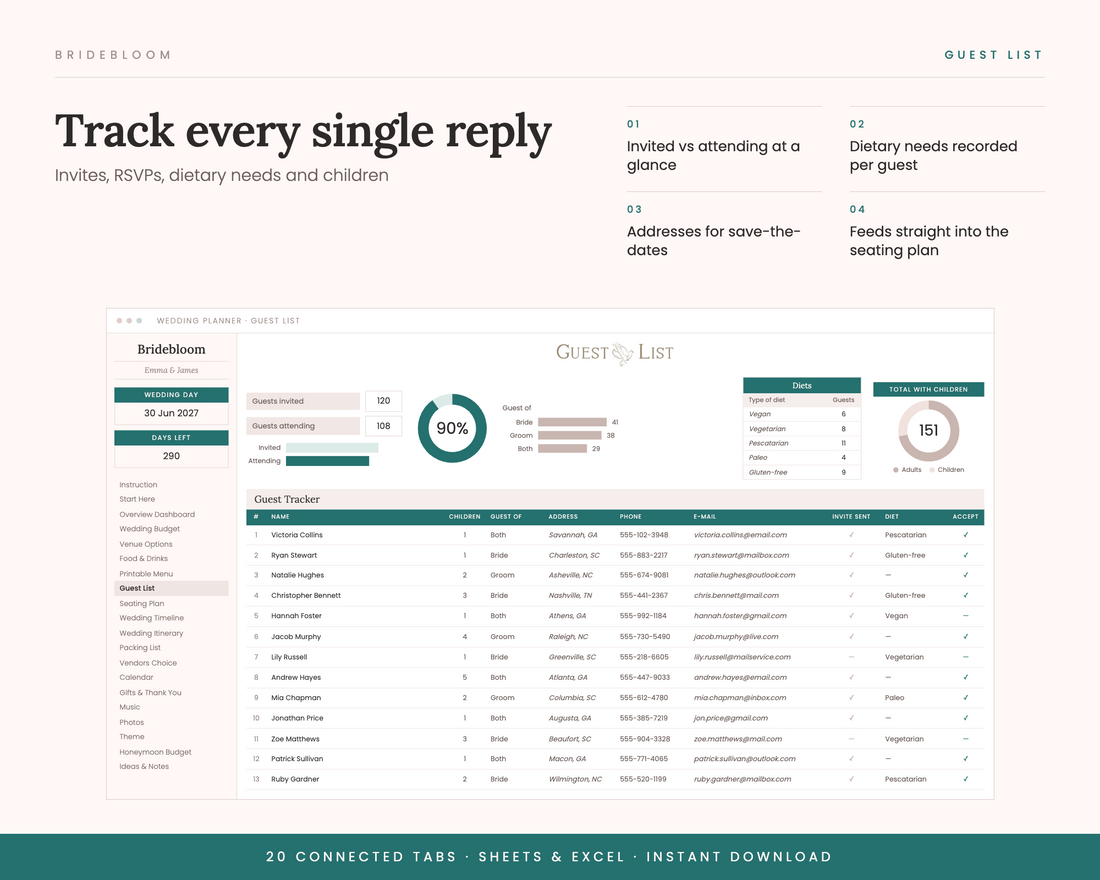
Every guest, reply, plus-one and dietary need in one place, counted for you.
Live seating chart
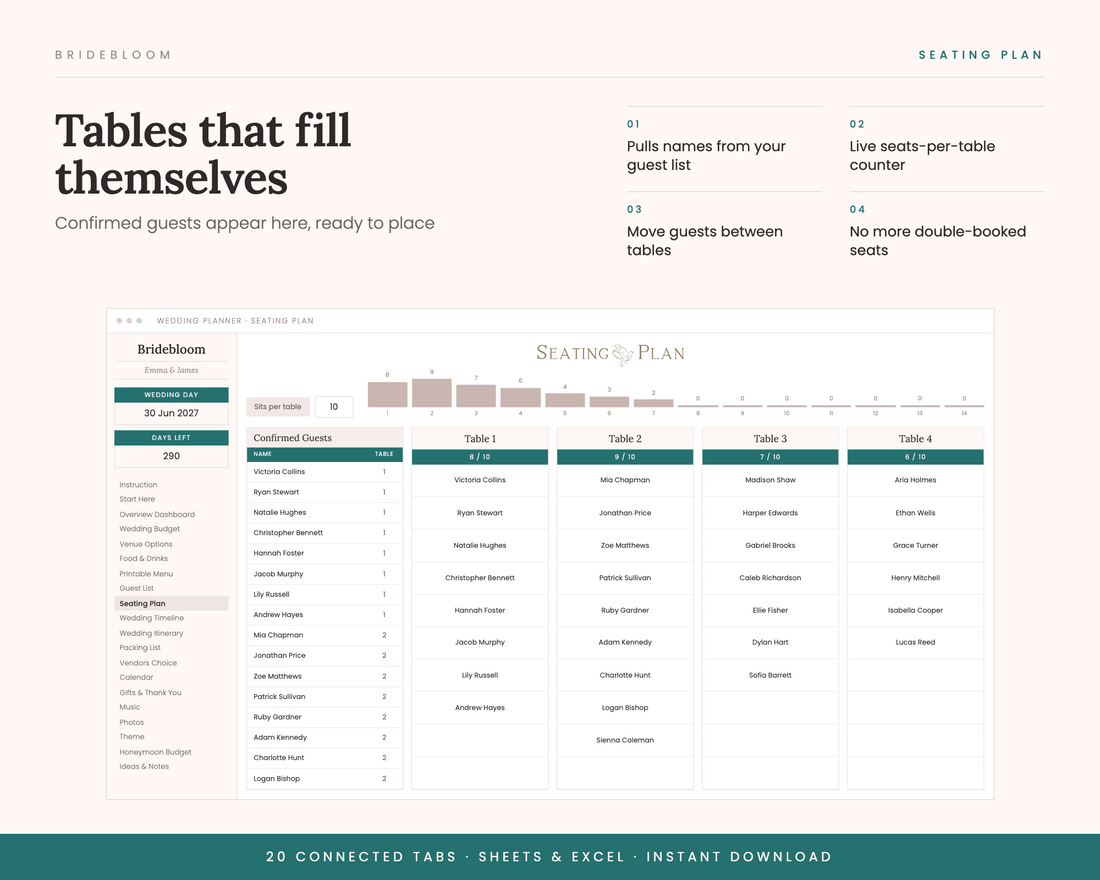
Attending guests flow into the seating plan with a seats-per-table counter.
12-month timeline
A month-by-month task list, day-of itinerary and calendar view.
Vendor & venue comparison
Compare quotes side by side and track what's booked, paid and outstanding.
Shareable with your partner
Lives in your Google Drive — share it with your fiancé, your mum, your maid of honour.
Built to stay current on its own
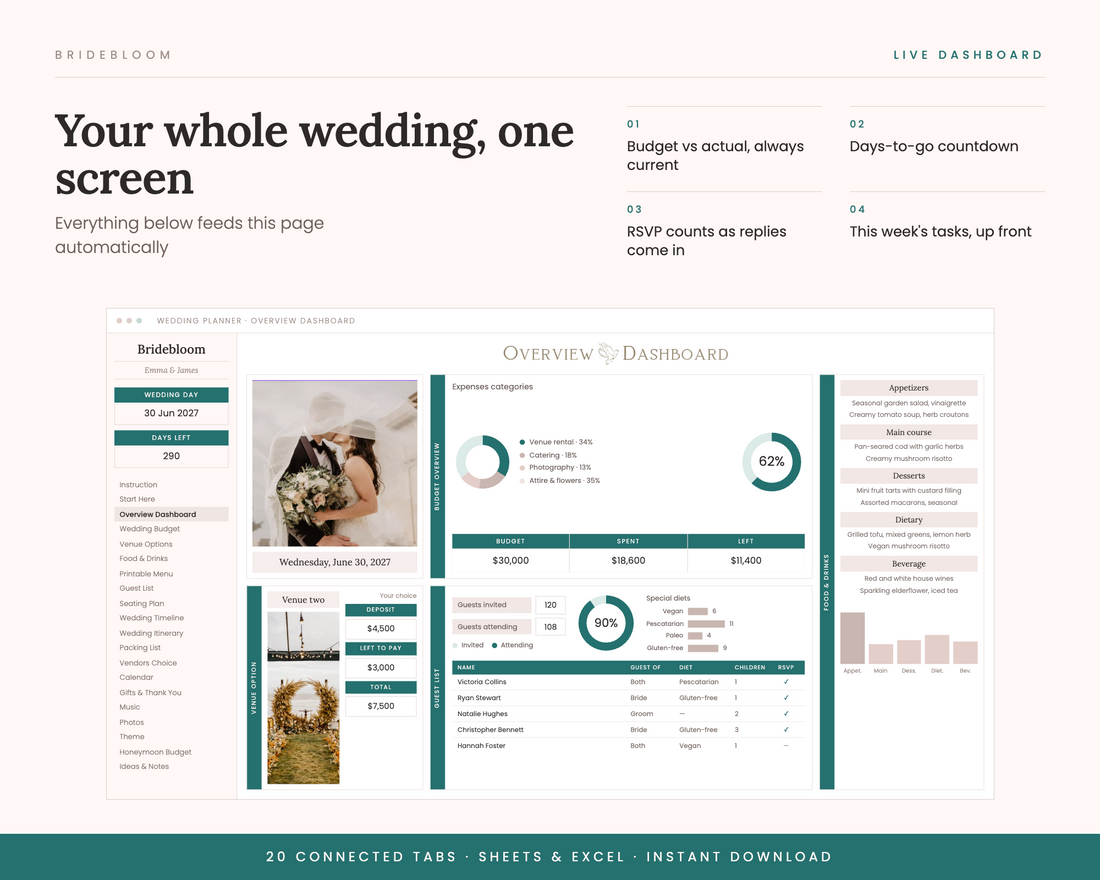
Open it and you already know where you stand
Days to go, what you've spent against what you planned, how many people have actually replied, and what needs doing this week.
- Budget vs actual, always current
- RSVP counts as replies come in
- This week's tasks, up front
Tick one box, three tabs update
Mark a guest as attending and they appear in the seating plan, ready to place. After the wedding they show up again in the thank-you tracker.
- Dietary needs recorded per guest
- Live seats-per-table counter
- Nothing ever typed twice
One number you can actually trust
Every category, planned against actual, with deposits paid and balances still owed — so you always know what's really left.
- Category breakdowns
- Vendor deposits and balances
- Formula cells locked so nothing breaks
Loved by organised brides
I had a notebook, two spreadsheets and a Notes app full of vendor numbers. Moved everything into this in one evening and finally felt like I could breathe.
The seating plan pulling straight from the guest list is the part that sold me. Ticked people off as RSVPs came in and the tables just filled themselves.
We were $1,800 over budget and didn't know it until the dashboard showed us. Caught it early enough to fix. Worth it for that alone.
Really well thought out. I'd love a few more colour themes, but the instructions tab meant my fiancé could use it without asking me anything.
I'm terrible with spreadsheets and I still got it set up on my phone in the car outside a venue viewing. Everything just calculates.
We shared it between us and both updated it from our phones. No more 'did you pay the florist deposit?' texts.
Twenty tabs, five jobs
Everything connected, so filling in one keeps the rest current.
The money
Budget tracker, vendor deposits and balances, food and drink costing, honeymoon budget.
The people
Guest list with RSVPs and dietary needs, seating plan, gifts and thank-you log, printable menu.
The timeline
Twelve-month task list, wedding-day itinerary, calendar view, and a packing list for both of you.
The details
Venue comparison, theme and colour board, music list, photo shot list, and a page for loose ideas.
Getting started
A setup page, the live dashboard, and written instructions for every single sheet.
Why brides are ditching the old way
| Bridebloom | Free template | Notebook | Planning app | |
|---|---|---|---|---|
| Everything in one file | ✓ | ✕ | ✓ | ✕ |
| Totals update themselves | ✓ | ✕ | ✕ | ✓ |
| Seating from your guest list | ✓ | ✕ | ✕ | Varies |
| Share with your partner | ✓ | ✓ | ✕ | ✓ |
| Yours forever, no subscription | ✓ | ✓ | ✓ | ✕ |
| Cost | $13.99 once | Free | ~$20 | Monthly |
From checkout to planning in two minutes
Buy
Checkout takes a minute.
Copy
One click saves your own copy to your Drive.
Plan
Start at the dashboard and work outward.
Format and delivery
- Format
- Google Sheets template — a free Google account is required
- Delivery
- Emailed link, immediately after checkout
- Access
- Saves to your own Google Drive and stays there
- Devices
- Laptop, tablet and phone via the Google Sheets app
- Editing
- Fully editable — formula cells are locked so nothing breaks
- Licence
- Personal use, one wedding. Share freely with your partner and family
- Refunds
- None once the link is sent, as it's a digital file
Before you buy
What exactly do I receive?
An email with a link. Click it and a copy of the planner saves straight to your own Google Drive — 20 connected tabs covering budget, guests, seating, vendors, timeline and more.
Is this a physical product?
No — it's 100% digital. Nothing is shipped, nothing to wait for, and nothing to throw away afterwards.
Do I need a Google account?
Yes, a free one. This is a Google Sheets template, so the link makes your own copy in seconds. It works on Mac, Windows, iPhone and Android.
Do I need to be good with spreadsheets?
No. You type into the cells you're meant to and everything else calculates itself. There's an instruction tab walking through every single sheet, step by step.
Can I edit and recolour it?
Yes. Change fonts, colours, add rows, rename things. Formula cells are locked so you can't accidentally delete the thing making your budget add up.
Can I share it with my fiancé?
Once it's in your Drive it's yours — share it with your partner, your maid of honour, whoever's helping. Everyone sees the same live version.
Can I print the sheets?
Yes. The menu, seating plan and day-of itinerary are laid out to print cleanly straight from Google Sheets.
What if something isn't working?
Email us and we'll fix it. A digital file means no refunds once the link is sent, but we'd rather sort the problem than leave you stuck.
Start planning tonight
One file. Everything in it. $13.99, yours to keep.
Get the wedding plannerInstant download · Works on phone and laptop